NASCAR App Guide: Free vs Premium, Live Leaderboard, Scanner and Downloads
A current guide to NASCAR Mobile and NASCAR Tracks, their free and paid features, live data, Drive video, Scanner audio, downloads and race-day limitations.
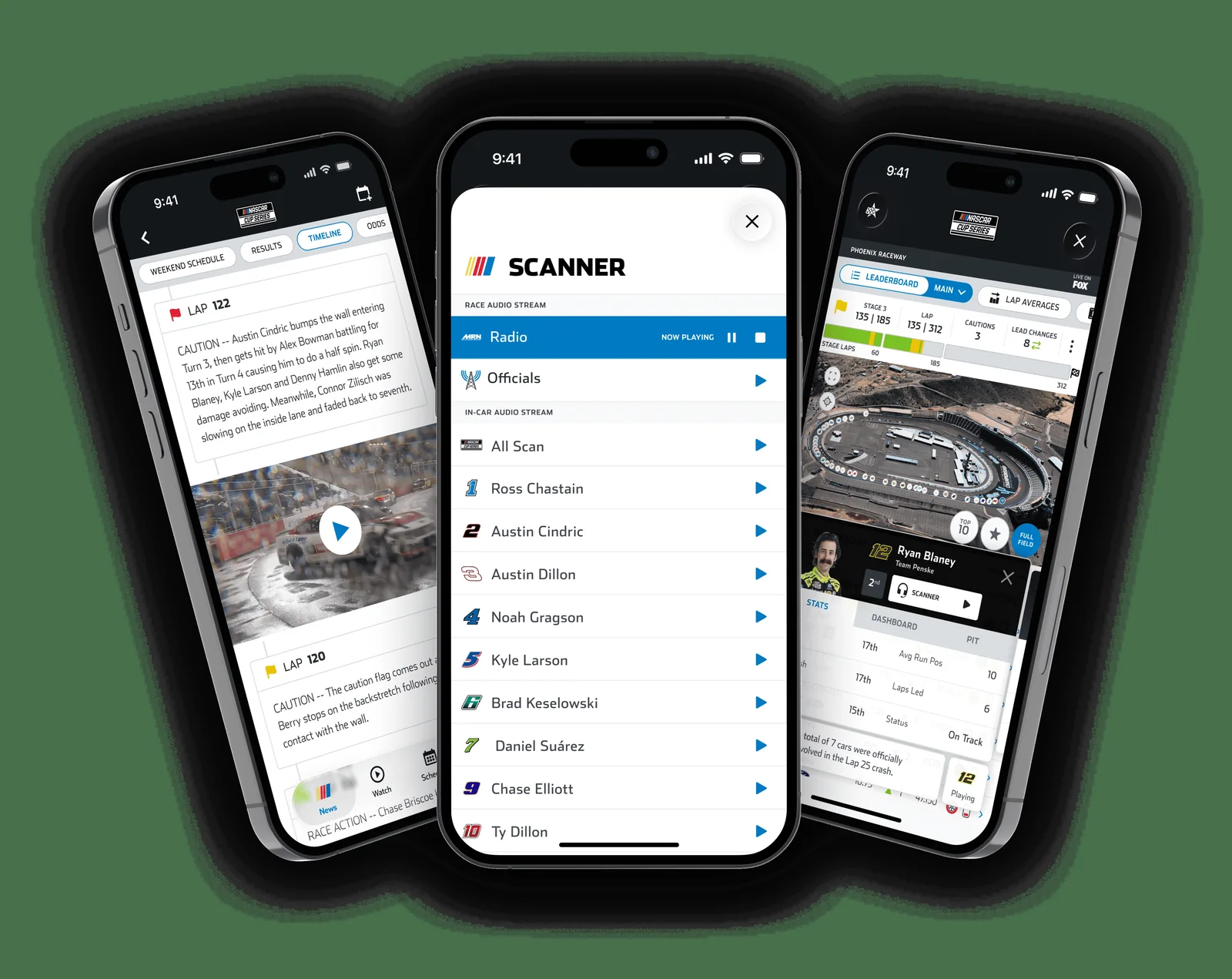
The official NASCAR app is free to install, and most fans can follow the schedule, standings, basic live leaderboard, timeline and broadcast radio without paying. NASCAR Premium is the mobile upgrade for race-team Scanner audio, Officials and All Scan, telemetry, richer leaderboard statistics and fewer ads. The separate NASCAR Tracks app is built for ticket access, maps and venue logistics. This guide was verified against official U.S. NASCAR support pages and current Apple/Google listings on August 13, 2026. The key limitation is simple: free or Premium app access does not automatically include the full live network race telecast. Think of NASCAR Mobile as a data, audio and alternate-view companion to the rights holder's coverage.
Which NASCAR app should you download?
Most fans should download NASCAR Mobile first. It is the free iPhone and Android race companion for schedules, standings, news, live scoring, the race timeline, available audio and video features. NASCAR Premium is an optional upgrade inside that app for deeper data, race Scanner channels and an ad-reduced experience. Download NASCAR Tracks as well when attending in person because that separate app handles venue maps, mobile tickets, parking, policies and weekend information. These distinctions and U.S. prices were checked on August 13, 2026.
| Option | Best for | Key role |
|---|---|---|
| NASCAR Mobile — free | Following a race at home or away | Live leaderboard, timeline, schedule, standings, broadcast radio and available Drive content |
| NASCAR Mobile — Premium | Fans who want a deeper second screen | Race-team Scanner audio, Officials/All Scan, telemetry, enhanced statistics and fewer ads |
| NASCAR Tracks | Fans going through the gates | Tickets, venue map, parking, policies, guest services and event-specific updates |
“Free download” does not mean every feature is free, and “live video” does not mean the app carries the full network race broadcast. NASCAR Mobile is most useful beside the television feed: its data and audio explain what the broadcast cannot show continuously. Use the NASCAR TV schedule to identify the actual channel or streaming service. The app's broadcast logos are tune-in directions, not a blanket streaming entitlement.
NASCAR Tracks answers a different set of race-weekend questions: which gate to use, where a fan experience is located, what the track permits and how to display a ticket. Some at-track Scanner or multi-view features exist only at selected venues. Before either kind of race day, confirm the active series and session on the NASCAR weekend schedule; live practice, qualifying and race features appear around their scheduled windows rather than acting like an always-on feed.
NASCAR Mobile free vs Premium: price and features
The free version is enough for schedules, standings and basic live race following. Premium earns its value through mobile race Scanner channels, richer leaderboard data, telemetry and convenience features—not through access to the network race telecast. In the United States, NASCAR advertised Premium at $4.99 per month, auto-renewing, or $29.99 for a one-time 2026 season purchase. However, NASCAR's Scanner sales page says that season option was available in February only.
| Feature | Free NASCAR Mobile | NASCAR Premium |
|---|---|---|
| Schedule, news and standings | Included | Included |
| Live leaderboard and Timeline | Included; sign-in can unlock the full free Race Tracker experience | Included with enhanced statistics |
| Alternate leaderboard stats | Stage points, lap leaders, fastest laps and more | Adds win probability, movers/fallers, long-run averages and laps in the top 10 |
| Live telemetry | Not part of the basic tier | Included where available |
| Audio on mobile | Broadcast radio; driver audio during practice/qualifying with exceptions | Adds race team channels, Officials and All Scan with event exceptions |
| Ads, PIP and casting | Ad-supported; standard viewing | Ad-free claim, picture-in-picture and casting support |
| Full TV race broadcast | Not included as a universal entitlement | Not included as a universal entitlement |
Which plan makes financial sense?
A fan who opens the app mainly to check the order, schedule and current NASCAR standings can remain on free access. Premium is most defensible for someone who regularly follows a driver's radio, wants Officials audio during cautions, or uses telemetry and long-run averages to understand the race beyond the TV graphics. Paying monthly for six renewals would equal $29.94, essentially the advertised season price, but that comparison does not restore a season offer after its sales window closes.
Always trust the price and trial terms displayed on the device paywall before confirming. The U.S. Apple listing visibly showed the current $4.99 monthly item alongside old legacy subscription entries, but did not clearly expose the current season SKU. Store catalog, tax, trial and regional availability can vary. Monthly billing renews until canceled through Apple or Google, so a one-race experiment should be canceled in the store subscription settings if the fan does not want another charge.
How the NASCAR Live Leaderboard and Race Center work
The Live Leaderboard is useful without Premium. During practice, qualifying and races, Race Center shows the running order and lets signed-in NASCAR Fan Rewards members switch among Top 10, favorite-driver and full-field views. The Timeline adds lap-by-lap notes and key moments, while Compare places selected drivers' position, speed and time data together. That combination turns the app into a second screen rather than a static scoring pylon.
Read the race, not just the position column
Start with position and laps completed, then use the alternate leaderboards to explain why the order is changing. Free views include stage points, lap leaders and fastest-lap information. Stage points show which playoff assets a driver has already banked; laps led identify who controlled track position; fastest laps hint at short-run speed. None alone proves who has the best car. A driver can set one quick lap in clean air while another carries better average pace over a tire run.
Premium adds win probability, movers and fallers, fastest laps run, 10-lap and 20-lap averages, laps spent in the top 10, and live telemetry where available. The long-run averages are especially valuable on an oval with tire falloff: they show whether a car remains competitive after the initial restart burst fades. Telemetry adds another layer of real-time data, but it should be read with the track context—traffic, pit strategy and cautions can matter more than a momentary speed trace.
Why the order can look strange during pit cycles
During green-flag stops, the leaderboard temporarily mixes drivers who have pitted with those still stretching the fuel window. A car shown in first may owe the position to staying out, while a freshly serviced car deeper in the order may hold the effective lead once the cycle completes. Timeline notes and Compare help connect those stops to track position. A caution in the middle of that sequence can change the entire reading, trapping some cars a lap down or rewarding those already on pit road.
Live scoring is an in-progress view, not the final record. After the checkered flag and any post-race review, use the site's NASCAR results for the completed classification and NASCAR standings for the resulting championship order. That distinction matters when a penalty, inspection finding or scoring correction changes what appeared on the app at the finish.
NASCAR Drive and video: what “live” does not mean
NASCAR Drive is an alternate race view, not a universal replacement for the television broadcast. NASCAR Mobile lists on-track and in-car cameras for Cup and O'Reilly events, while current Cup driver stories can mix in-car clips with broadcast highlights. The Watch area also includes the 24/7 NASCAR Channel and NASCAR Classics. All are legitimate video products, but “live NASCAR content” is broader than “the live network race telecast.”
What an in-car feed adds
A selected driver's camera can reveal how quickly traffic closes, how dirty air changes the car ahead and how little forward visibility remains in a drafting pack. It also stays with one story while the television director follows battles elsewhere. That focus is the benefit and the limitation: the feed may show the driver's immediate problem but not the pit cycle, caution cause or rival strategy reshaping the full order. Pair it with the leaderboard and TV coverage for context.
Timeline video and live driver stories are similarly supplemental. They surface a restart, pass, pit stop or incident around the moment it occurs, rather than promising continuous flag-to-flag television coverage. The NASCAR Channel is a free stream of NASCAR programming and shows in the Watch section, but its existence does not mean every Cup, O'Reilly or Truck race airs there live. Use the current NASCAR TV schedule and the event's tune-in logo to find the rights-holding channel or service.
Availability changes by event and device
NASCAR says Driver Telemetry and Race Tracker are unavailable for stand-alone O'Reilly Auto Parts Series and Craftsman Truck Series events. Other video features can also vary by series, venue and location. Casting a supported driver camera or highlight requires the phone and Chromecast to share Wi-Fi, while picture-in-picture and casting are listed among Premium conveniences. The sensible rule is to check the live Race Center before an event and never buy Premium solely on the assumption that a particular video feed will appear.
Scanner and live audio: which channels you can hear
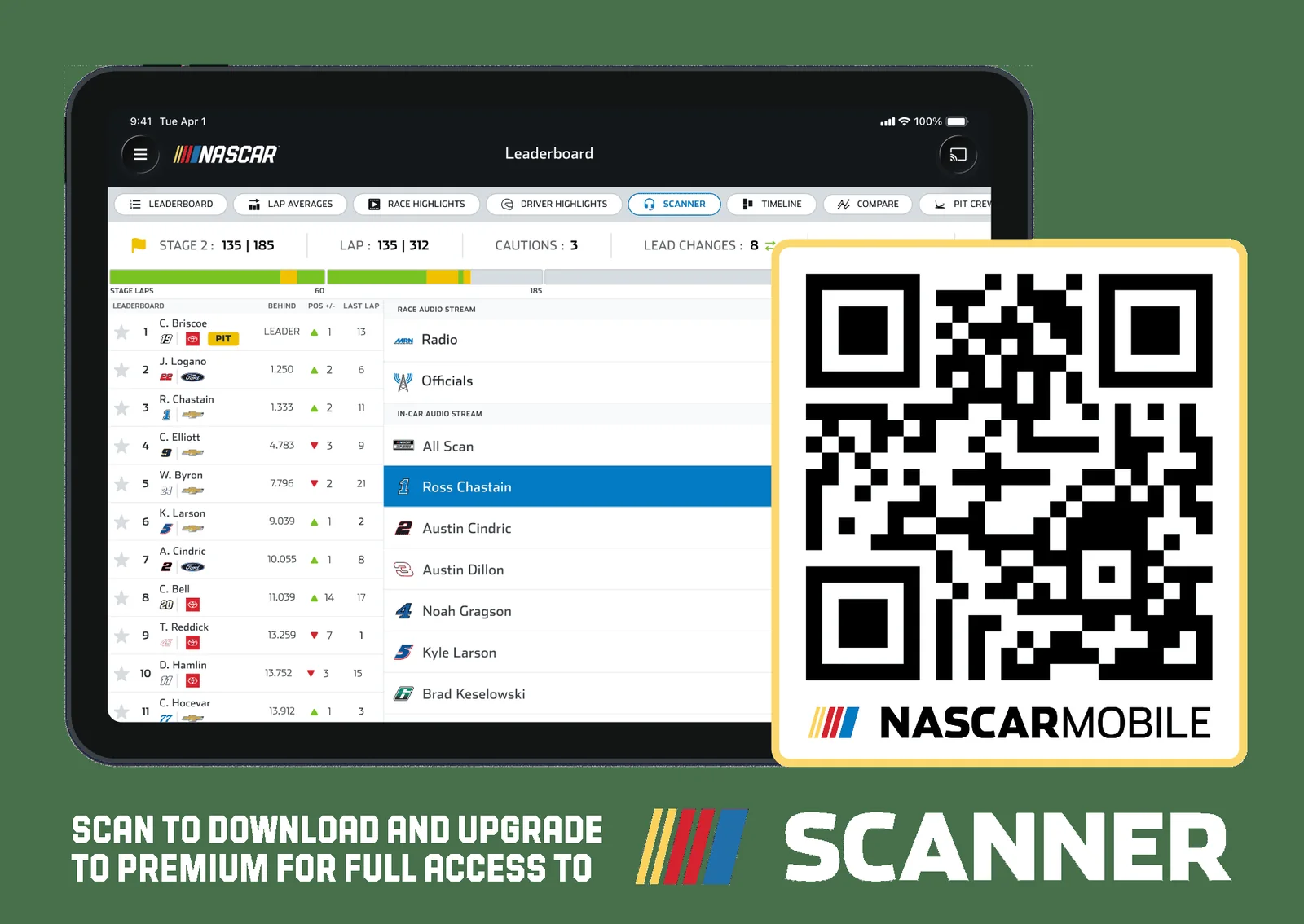
NASCAR Scanner is an audio product, not a race video stream. Its most useful channels answer different questions: a driver's team channel follows spotter calls and crew strategy, the Officials channel follows race-control communications, All Scan moves among available team channels, and broadcast radio supplies the conventional play-by-play call. Access depends on whether you listen on the web or in the mobile app.
| Listening method | What is included | Main limitation |
|---|---|---|
| Free NASCAR Mobile | Broadcast radio; driver audio in practice and qualifying where supported | Race-day team channels require Premium |
| Premium NASCAR Mobile | Broadcast radio, available driver/team audio in races and other sessions, Officials, and All Scan | Event exceptions still apply |
| Signed-in NASCAR.com | Free full Scanner access through the web Live Leaderboard at supported live events | A verified NASCAR account is required |
That web option is easy to miss. A viewer at a computer can sign in with a verified NASCAR Fan Rewards account and use Scanner free during supported practice, qualifying and race sessions. A viewer who wants the same full channel selection inside NASCAR Mobile needs Premium. Free mobile users still receive broadcast radio, so a phone can provide live commentary without a subscription, but it does not unlock every team's race communications.
How to choose a channel and keep it synchronized
Choose one driver when you want the detail behind a pit call or a developing handling complaint. Choose Officials when the important story is a restart, penalty or track condition. All Scan is better for sampling the field, although jumping between teams can make a long strategy sequence harder to follow. If audio reaches the phone before a delayed television picture, use Scanner's pause function to bring the call closer to the broadcast rather than assuming the feeds are defective.
Availability is not universal. NASCAR says Scanner is unavailable during standalone O'Reilly Auto Parts Series and Craftsman Truck Series events; its current support page names St. Petersburg, IRP and Lime Rock as examples. Those names should not be treated as a permanent exhaustive list. Check the event in the NASCAR schedule and open Race Center before the session. Even at supported events, NASCAR describes the channels as “available” and notes exceptions, so a particular driver feed should never be guaranteed in advance.
NASCAR Mobile vs NASCAR Tracks: use both at the track
NASCAR Mobile and NASCAR Tracks solve different problems. Mobile is the race-following app: it carries news, schedules, standings, Race Center data, Drive content and Scanner access. Tracks is the venue companion: it organizes tickets, gates, parking, policies, maps, guest services and the weekend's fan activities. A first-time visitor should install both rather than expect one app to contain the other's complete toolset.
| Need | Open this app | Why |
|---|---|---|
| Follow lap data or team audio | NASCAR Mobile | Race Center, leaderboards, Drive and Premium Scanner live here |
| Find parking, gates or policies | NASCAR Tracks | Venue maps and guest information are organized by favorite track |
| Enter with a mobile ticket | NASCAR Tracks | Its My Tickets area connects to the track's ticket account |
| See Q&As and fan activities | NASCAR Tracks | The at-track weekend schedule includes more than on-track sessions |
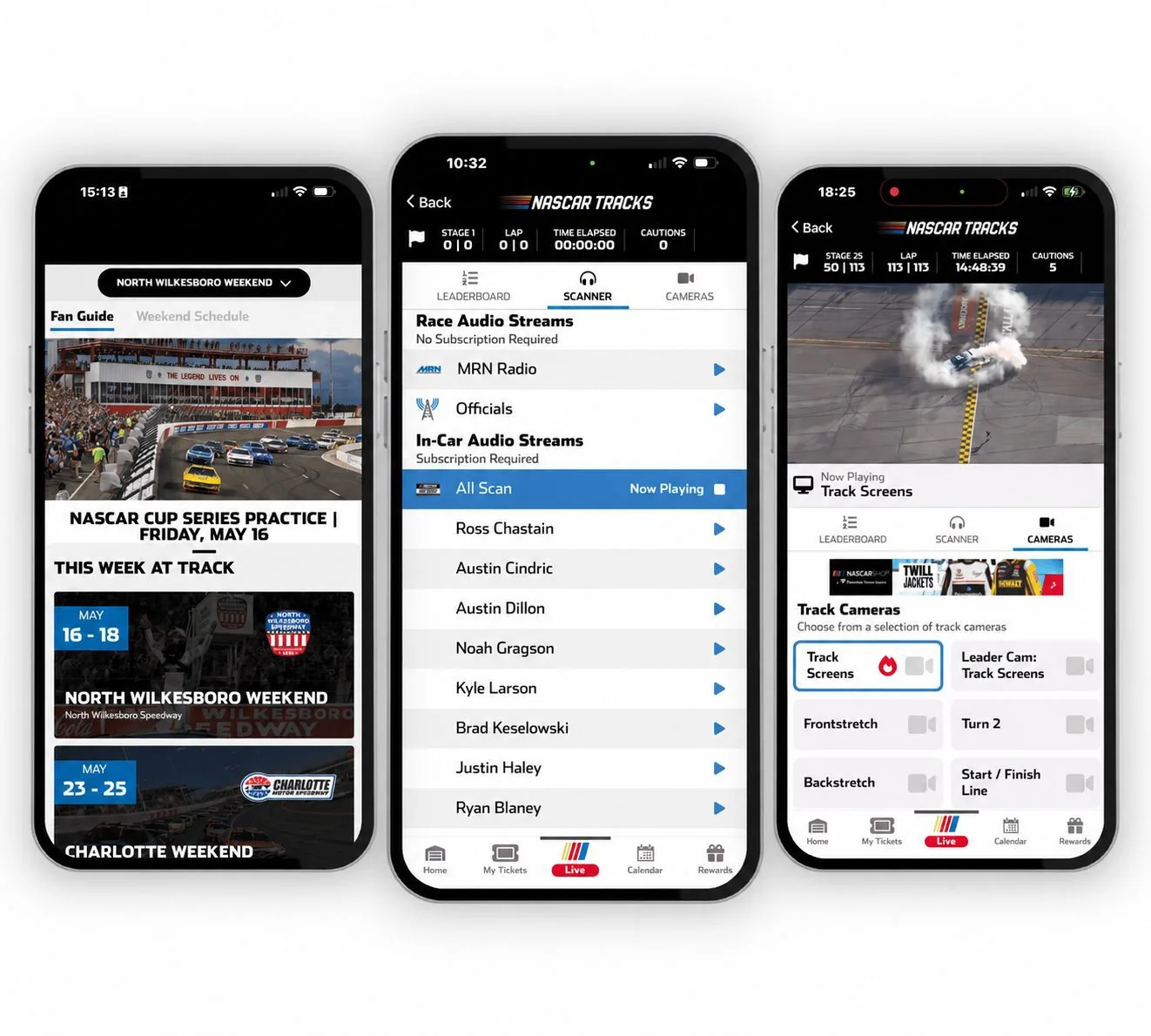
Set up the Tracks app before race morning
Select the correct favorite track, sign into the NASCAR account and then test My Tickets. NASCAR says the Tracks app shares the same NASCAR login used by NASCAR.com, Mobile, Fantasy and Scanner, but the ticket area asks for Ticketmaster Account Manager credentials. Those may be a separate sign-in. Download the tickets ahead of arrival and add them to the phone wallet when that option appears; crowded properties can make cellular access unreliable precisely when the gate agent needs the barcode.
Location and notification permissions can be useful for wayfinding, timely venue messages and certain on-site features, but enable only what you plan to use. At-track Scanner is offered only at select venues and can be a paid add-on. Multi-view in-car or track cameras are also limited to selected tracks. Even if a tab appears during the weekend, do not assume the same feature will exist at the next race. Confirm availability and any displayed price inside the current app.
The simplest race-day workflow is Tracks for getting around the property and Mobile for understanding the race. Save the logistical essentials before leaving home, then use the live tools as connectivity permits. That division also prevents a ticket-login issue from being mistaken for a NASCAR Mobile subscription problem.
How to download and set up the NASCAR app
Download NASCAR Mobile only from the Apple App Store or Google Play, and verify that NASCAR Digital Media, LLC is the developer. The installation is free, but Premium features remain in-app purchases. On August 13, 2026, Apple's U.S. listing showed version 16.6.1, a 470.6 MB download and iOS or iPadOS 17.0 as the minimum. Google Play determines compatibility for the specific Android device rather than exposing one dependable universal version in its public listing.
A five-minute pre-race setup
- Install updates over Wi-Fi and leave enough storage for the app, video cache and future updates.
- Create or sign into a NASCAR account, then save favorite drivers so preferences can follow the account.
- Review notifications and location permissions. Turn on alerts you value; location is more important for track-aware tools than for reading news at home.
- Open the weekend page well before green flag. Confirm the series, session, broadcast logo, leaderboard and desired audio/video tab.
- If considering Premium, first verify that the specific event supports the feature you want. Then read the exact price, renewal language and trial terms displayed by the phone's store.
The store privacy panels disclose use of categories such as contact information, identifiers, usage data, diagnostics and, on Google Play, location and personal information. Those disclosures can vary with feature, region and age. Read them before granting permissions, especially if the app will run with location services at a venue. Availability can also differ by region, so no store download by itself guarantees the same cameras, telemetry or media everywhere.
Manage or restore Premium in the store that billed you
Buying through Apple or Google means that storefront owns the subscription controls. Change or cancel the plan in the Apple subscriptions or Google Play subscriptions screen; deleting NASCAR Mobile does not cancel billing, and NASCAR says its customer service cannot manage app-store subscriptions. On Apple, a reinstallation or new device can use Restore on the app paywall when it shares the Apple ID used for the original purchase.
Finally, use the app as a live companion rather than the sole permanent record. Add race dates from the NASCAR calendar, and check the NASCAR results page after the event for the finalized order. That combination protects against a weak connection, a delayed live feed or a leaderboard that has not yet incorporated post-race penalties.
About the author
NASCAR Schedule Editorial Team
The NASCAR Schedule editorial team turns verified schedules, timing and scoring, official announcements and race-weekend context into direct answers for fans.
View all articles by this author →Join the discussion
Comments
Sign in with Google to comment. Keep it race-focused; new comments are reviewed before publication.
Loading comments…